How to Show Estimated Delivery Dates on Shopify by Pincode
ILS Indian Logistics Services
Customers want to know one thing before placing an online order: "When will I get it?"
A generic message such as "Ships in 3-5 business days" does not give every shopper the same useful information. Delivery time can change depending on the customer's location, order time, warehouse, weekends, holidays, and your handling process.
For Shopify merchants, showing an estimated delivery date based on the customer's pincode makes that information much clearer. It gives shoppers a practical answer such as "Get it by 25 May" before they add the product to their cart.
This guide explains how pincode-based estimated delivery dates work on Shopify and how Indian Logistics Services Shopify App can help you set them up.
What Is an Estimated Delivery Date on Shopify?
An estimated delivery date (EDD) tells customers when they can reasonably expect an order to arrive.
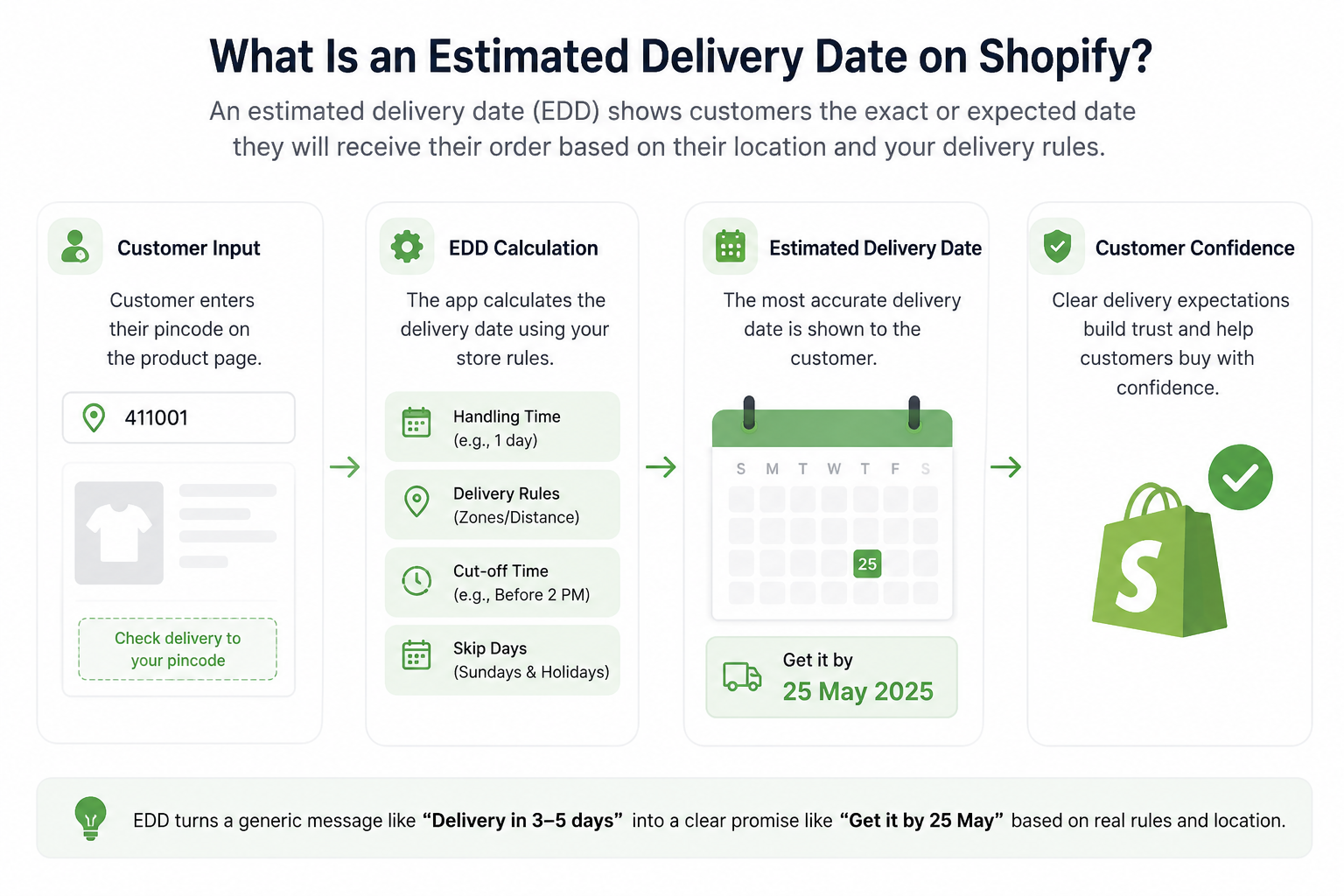
Instead of showing only: Delivery in 3–5 days
a store can display: Get it by 25 May
The date can be calculated using factors such as the customer's pincode, order processing time, delivery distance, cutoff time, weekends, and holidays.
Shopify provides delivery-date capabilities in certain contexts, including Shop Promise, while merchants looking for more customized product-page and location-based delivery logic can use dedicated delivery-date solutions. Also get a detailed guide about India post parcel rates per kg.
Why Show Delivery Dates by Pincode?
A delivery estimate becomes more useful when it reflects the customer's actual location.
For example, suppose a store ships from Mumbai:
| Customer Location | Example Pincode | Estimated Delivery |
| Mumbai | 400001 | Same day |
| Pune | 411001 | 1–2 days |
| Delhi | 110001 | 3 days |
| Remote area | 682001 | 4–5 days |
The exact calculation depends on the merchant's logistics setup, but the principle is simple: different destinations can have different delivery timelines.
Showing that information before checkout can help customers make faster purchase decisions and set clearer delivery expectations. Current Shopify delivery-date solutions commonly emphasize pincode/ZIP-code rules, processing time, cutoff times, holidays, and product-page delivery estimates.
How to Show Estimated Delivery Dates on Shopify by Pincode
The simplest approach is to add an estimated delivery widget to the Shopify product page and configure the rules that determine the date.
Also follow Estimated Delivery Date step by step setup guide.
Step 1: Add the EDD Block to Your Product Page
With Indian Logistics Services, go to:
Online Store → Themes → Customize
Select the Default Product page.
Under Product information, select:
Add block → ILS - Estimated Delivery
For better visibility, place the EDD block directly below the Add to Cart button. This puts delivery information close to the purchase decision.
Step 2: Set Your Origin Warehouse
Next, configure where your orders are shipped from.
In the ILS EDD settings, enter your origin warehouse city or pincode.
This is important because delivery time depends on the distance between your shipping location and the customer's destination.
Step 3: Add Your Handling Time
Not every order leaves the warehouse immediately.
If your team normally needs one day to pack and prepare an order, set the handling time to 1 day.
For example:
Order placed → 1 day handling → Delivery transit → Estimated arrival
This prevents the storefront from promising a delivery date that is earlier than your actual fulfillment process.
Step 4: Create Pincode Delivery Rules
This is where your delivery logic becomes more useful.
You can configure delivery rules based on:
- Location or zones
- Distance in kilometers
- Same-day delivery
- Order cutoff time
- Operational days
For example, you could configure:
| Delivery Rule | Example Setting |
| Same city | Same-day delivery before 2 PM |
| Within 500 km | 2 days |
| Metro cities | 2–3 days |
| Rural areas | 4–5 days |
The result is a more relevant ETA instead of showing the same delivery message to every customer.
Also Read: https://ilsportal.io/blogs/shipping-eta-etd-atd-ata-full-forms-meanings
Use Cutoff Times for Same-Day Delivery
Cutoff times are particularly important for stores offering same-day or next-day delivery.
For example, you may promise:
Order before 2 PM → Delivered today
But an order placed after 2 PM may move to the next operational delivery day.
A delivery-date system should therefore consider the order time when calculating the displayed date. Cutoff-time logic is also a common feature among current Shopify EDD solutions.
Exclude Sundays and Public Holidays
Your delivery estimate should reflect your actual working calendar.
ILS allows merchants to configure Days Off, including:
- Sundays
- Public holidays
- Other non-working dates
For example, if a calculated delivery date falls on a Sunday and Sunday is excluded, the estimate can move to the next operational day.
You can also add holidays such as Holi, Diwali, or Independence Day so they are not incorrectly counted as delivery days.
This is an important detail that simple "3-5 days" messages can easily overlook.
Show a "Get It By" Date on the Product Page
The delivery message should be easy to understand.
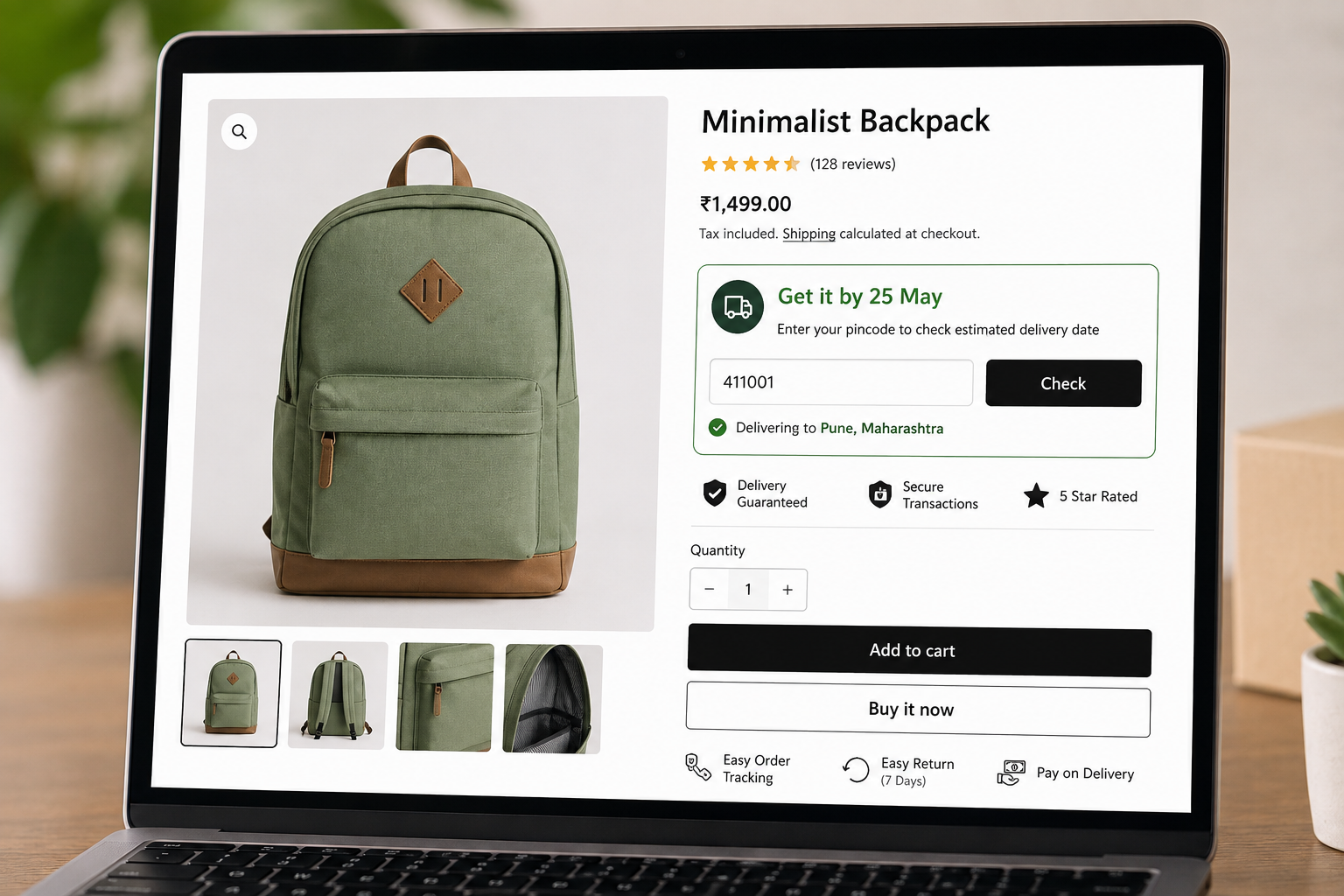
Instead of forcing customers to calculate a delivery window themselves, you can display a direct message such as:
Get it by 25 May
ILS also supports dynamic placeholders such as:
- {{date}} - automatically displays the calculated delivery date
- {{days}} - displays the delivery-day count
For example:
Fast delivery by {{date}} can automatically become: Fast delivery by 25 May
This makes the information easier to scan and keeps the message dynamic.
Add Trust Signals Alongside Delivery Information
Delivery information can also be combined with trust-building messages.
The ILS EDD feature supports badges such as:
| Trust Badge | Purpose |
| Delivery Guaranteed | Reinforces delivery confidence |
| Secure Transactions | Highlights payment security |
| 5 Star Rated | Builds social trust |
| Easy Order Tracking | Communicates tracking availability |
| Easy Return | Highlights the return policy |
| Pay on Delivery | Communicates COD availability |
These elements can appear alongside the delivery estimate to give customers more confidence before purchase.
Configure Return Information Dynamically
ILS EDD is not limited to delivery dates.
You can configure a return window, such as 7, 15, or 30 days, and set a Shopify product tag for items that are not eligible for returns.
The storefront can then show different messages for returnable and non-returnable products.
For eligible products, the return period is calculated from the delivery date, rather than simply from the order date.
Handle Restricted Pincodes
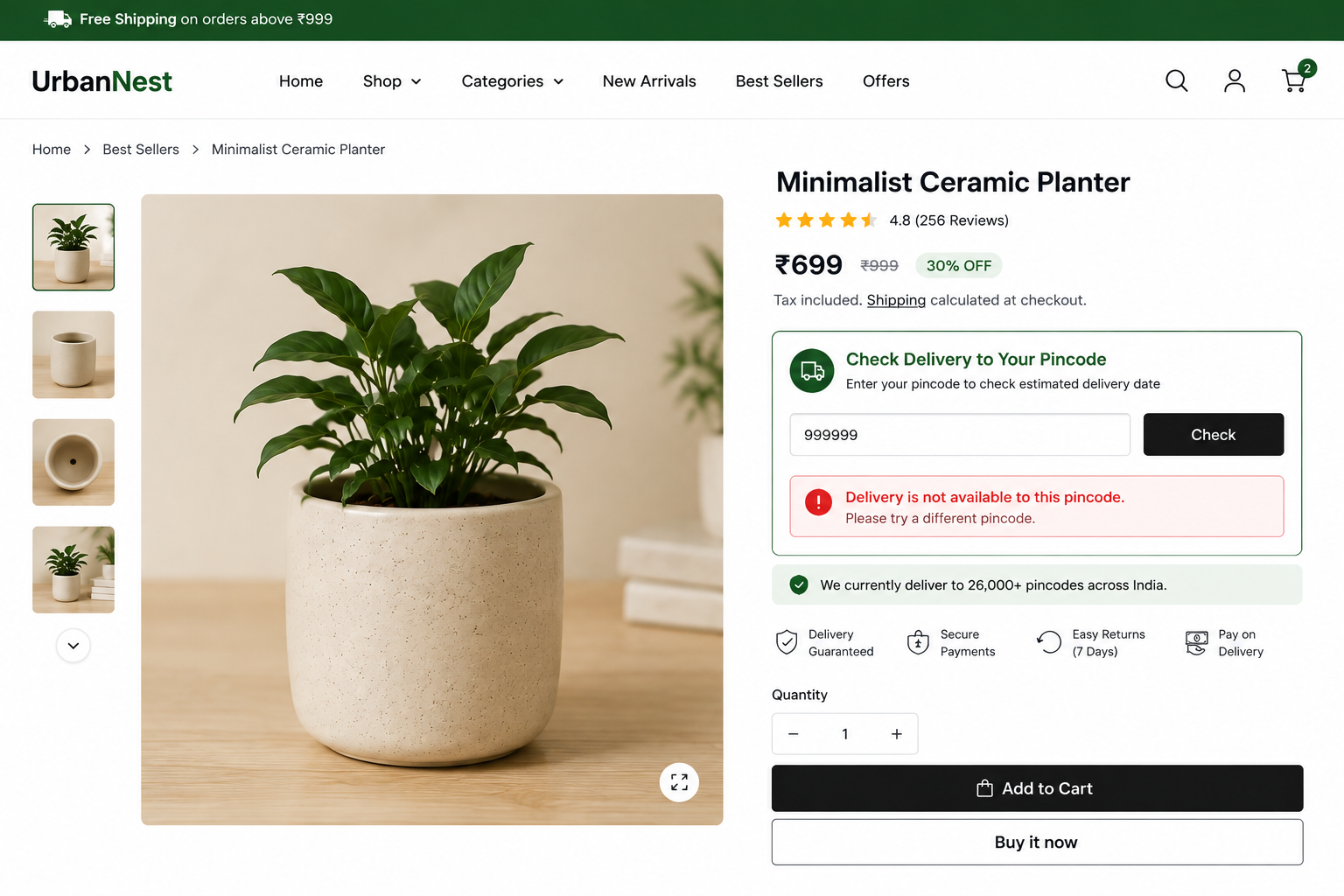
Some merchants cannot deliver to every location.
With ILS, you can add unsupported pincodes to the Restricted Pincodes list.
When a customer enters one of those pincodes, the storefront can communicate that delivery is unavailable rather than displaying an inaccurate delivery promise.
This is especially useful for merchants with regional service limitations or carrier restrictions.
ILS Portal: Manage Delivery Expectations More Clearly
The ILS Portal platform is designed to help Shopify merchants manage shipping and logistics operations while giving customers clearer delivery information.
The EDD functionality extends that experience to the storefront by allowing merchants to configure delivery rules and present a calculated delivery date directly on product pages.
For merchants serving customers across different Indian locations, this is particularly useful because delivery timelines can vary significantly by pincode, distance, service area, and operational schedule. Get to know about the best delivery partner app.
How the ILS EDD Calculation Works
At a high level, the storefront follows a simple process:
Customer enters pincode → ILS identifies the applicable delivery rule → handling time and delivery time are calculated → Sundays/holidays are excluded → estimated delivery date is displayed
For example:
Pincode: 411001
Handling time: 1 day
Delivery time: 2 days
Non-working days: Sunday excluded
The customer sees the resulting estimated date rather than having to calculate the timeline themselves.
Best Practices for Shopify Estimated Delivery Dates
Keep your delivery promise realistic. An accurate three-day estimate is more valuable than an aggressive one-day promise that is frequently missed.
Use your actual handling and delivery timelines when configuring EDD rules.
Place the delivery estimate close to the Add to Cart button so shoppers see it before making a purchase decision.
Also keep the message simple. "Get it by 25 May" is easier to understand than a complicated shipping calculation.
Most importantly, update holidays, cutoff times, restricted pincodes, and delivery rules whenever your logistics operation changes.
Final Takeaway
A pincode-based estimated delivery date turns a vague shipping promise into useful information customers can understand immediately.
Instead of asking "How long does delivery take?", shoppers can see "Get it by [date]" based on their location and your configured delivery rules.
With Indian Logistics Services, Shopify merchants can combine pincode-based delivery logic, handling time, cutoff times, delivery zones, distance rules, Sundays, holidays, restricted pincodes, trust badges, return rules, and storefront customization in one EDD experience.
For stores where delivery transparency matters, showing an accurate estimated delivery date before checkout can make the buying journey clearer and more trustworthy.
Frequently Asked Questions
Can Shopify show estimated delivery dates by pincode?
Yes, pincode-based delivery dates can be displayed using specialized Shopify delivery-date solutions. These tools can use the customer's location to apply different delivery rules.
How can I show an estimated delivery date on a Shopify product page?
You can add a delivery-date widget to your product page. With ILS, use the Shopify Theme Editor and add ILS - Estimated Delivery under Product Information.
Can I show different delivery dates for different pincodes?
Yes. ILS supports delivery rules based on location, zones, and distance, allowing different destinations to have different estimated delivery times.
Can I exclude Sundays and holidays from delivery calculations?
Yes. ILS lets merchants skip Sundays and add specific public holidays so those dates are excluded from the delivery calculation.
Can I set a same-day delivery cutoff time?
Yes. ILS supports same-day delivery rules with a configurable cutoff time. For example, orders placed before 2 PM can qualify for same-day delivery.
Can I restrict certain pincodes?
Yes. You can add unsupported pincodes to the Restricted Pincodes list so customers in those areas are informed that delivery is unavailable.
Can I customize the "Get it by" message?
Yes. ILS lets you customize the delivery text and use dynamic placeholders such as {{date}} and {{days}}.
Does an estimated delivery date guarantee delivery?
An estimated delivery date is a delivery expectation, not a guarantee that a carrier will arrive at the exact time or date. Merchants should configure ETAs based on realistic fulfillment and transit times.